VPS for Algorithmic Tradingfaster, steadier, safer execution
Run MT5 on a dedicated Windows Server in a professional data center. Connect via standard RDP from any device. Cut latency, keep your robots running 24/7, and reduce slippage.
Why a VPS can improve your results
Professional traders rely on VPS hosting for critical advantages that home setups cannot match.
Hosting near financial hubs reduces round-trip time vs. home ISP. For scalpers, every 10–30 ms matters.
Your robots keep running even when your laptop is off or your Wi-Fi drops.
CPU/RAM reserved for your MT5, with SSD on hardware RAID10 for reliability.
Use standard RDP from Windows, macOS, iOS, or Android to manage your terminals.
No random system updates, popups, or power naps interrupting your trading.
Our AI model server is located in USA (Chicago). For the lowest model latency, choose a US data center.
Choose a data center close to our AI model
(USA, Chicago)
New York, USA
Selected data center
Closer to Chicago = lower AI model latency. Consider US East or New York for the best experience.
Tip: Aim for total latency to broker + AI model under 30–50 ms for scalping strategies.
Find your plan in 30 seconds
Tell us about your setup and we'll recommend the right resources.
Multiple EAs, standard indicators
3
CPU Cores
4
GB RAM
60
GB SSD
Suggested plans from our recommended providers:
🏆 OVHcloud
VPS-1
$4.54/mo
🍫 Chocoping
CHOCO — 4GB
$31.99/mo
⚡ FXVM
Advanced VPS
$50/mo
🚀 ForexVPS
Core
$40/mo
Recommended VPS Providers
We strongly recommend OVHcloud for the best quality and value — it's our #1 pick, shown first below. The other providers are reliable alternatives depending on your location and budget.
Best overall value for 2026. Hillsboro (US-West) is ~50 ms to our Chicago AI model — inside the safe zone for MT5 execution. If you scalp sub-10 ms and need the lowest possible model latency, a Chicago/US-East host edges it, but for nearly all EASY Bots users OVH's price-to-performance wins.
Windows Server is a separate paid OS add-on (~$16–20/mo) on top of the VPS price. Select it during checkout so the total isn't a surprise (e.g. VPS-3 at $12.32 becomes ~$28–32/mo with Windows).
How many MT5 accounts fit each plan
Rule of thumb: 1 vCore / 2 GB RAM ≈ 1 MT5 copy (Windows itself needs ~2 GB).
Setup at OVH — exact clicks
- 1On us.ovhcloud.com open VPS and start an order.
- 2Set data center / region to North America — US West (Hillsboro).
- 3Under OS, choose Windows Server (paid add-on) instead of the default Linux.
- 4Pick VPS-3 or VPS-4 for 3–5 MT5 accounts, then complete checkout.
- 5Connect via RDP using the guide below and install MT5.
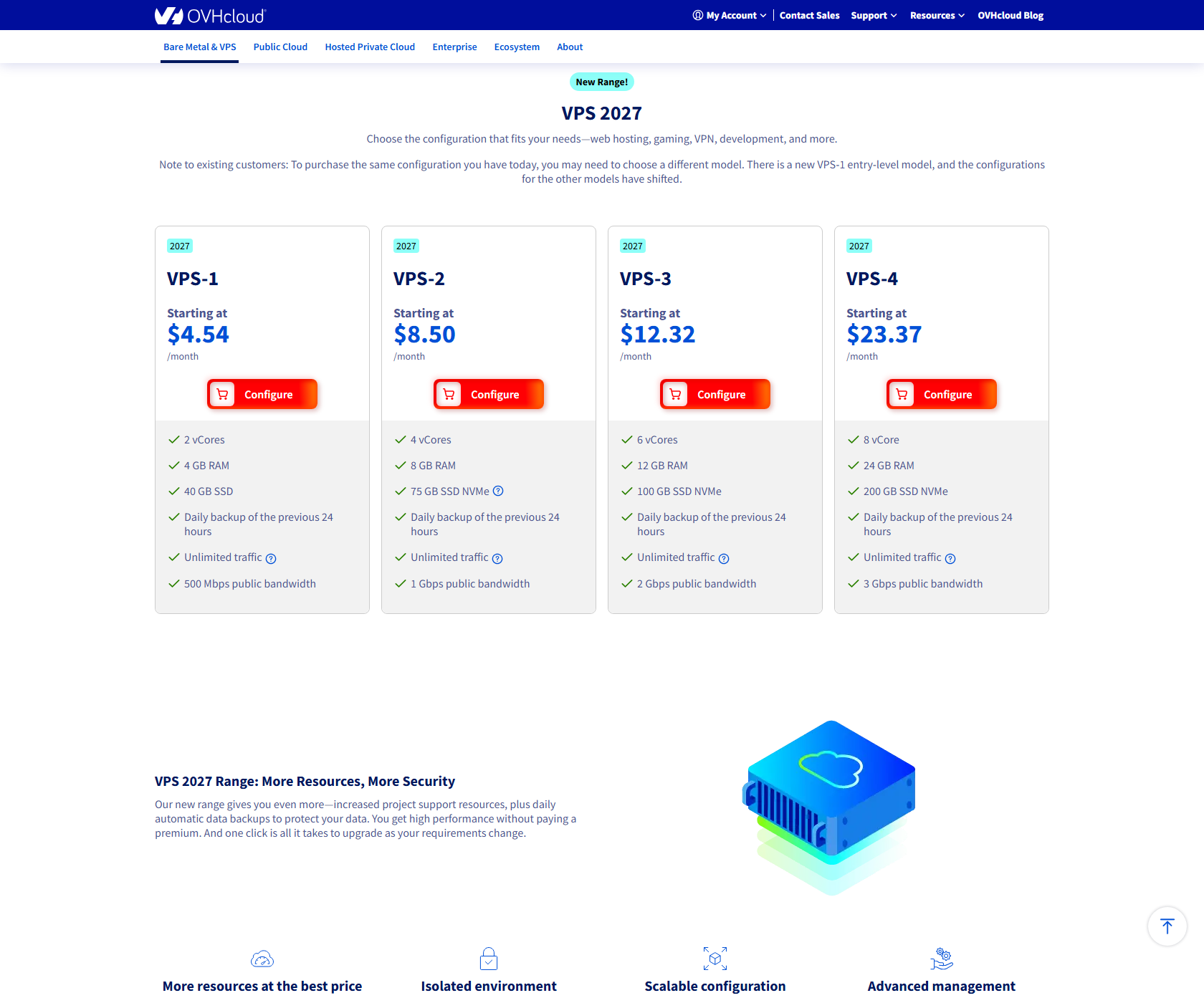
VPS-1
$4.54/mo
2 vCores, 4 GB RAM, 40 GB SSD — entry / 1 light account
VPS-2
$8.50/mo
4 vCores, 8 GB RAM, 75 GB NVMe — 1–2 MT5 accounts
VPS-3
$12.32/mo
6 vCores, 12 GB RAM, 100 GB NVMe — 3–5 accounts (recommended)
VPS-4
$23.37/mo
8 vCores, 24 GB RAM, 200 GB NVMe — 5–6+ accounts
Click to enlarge
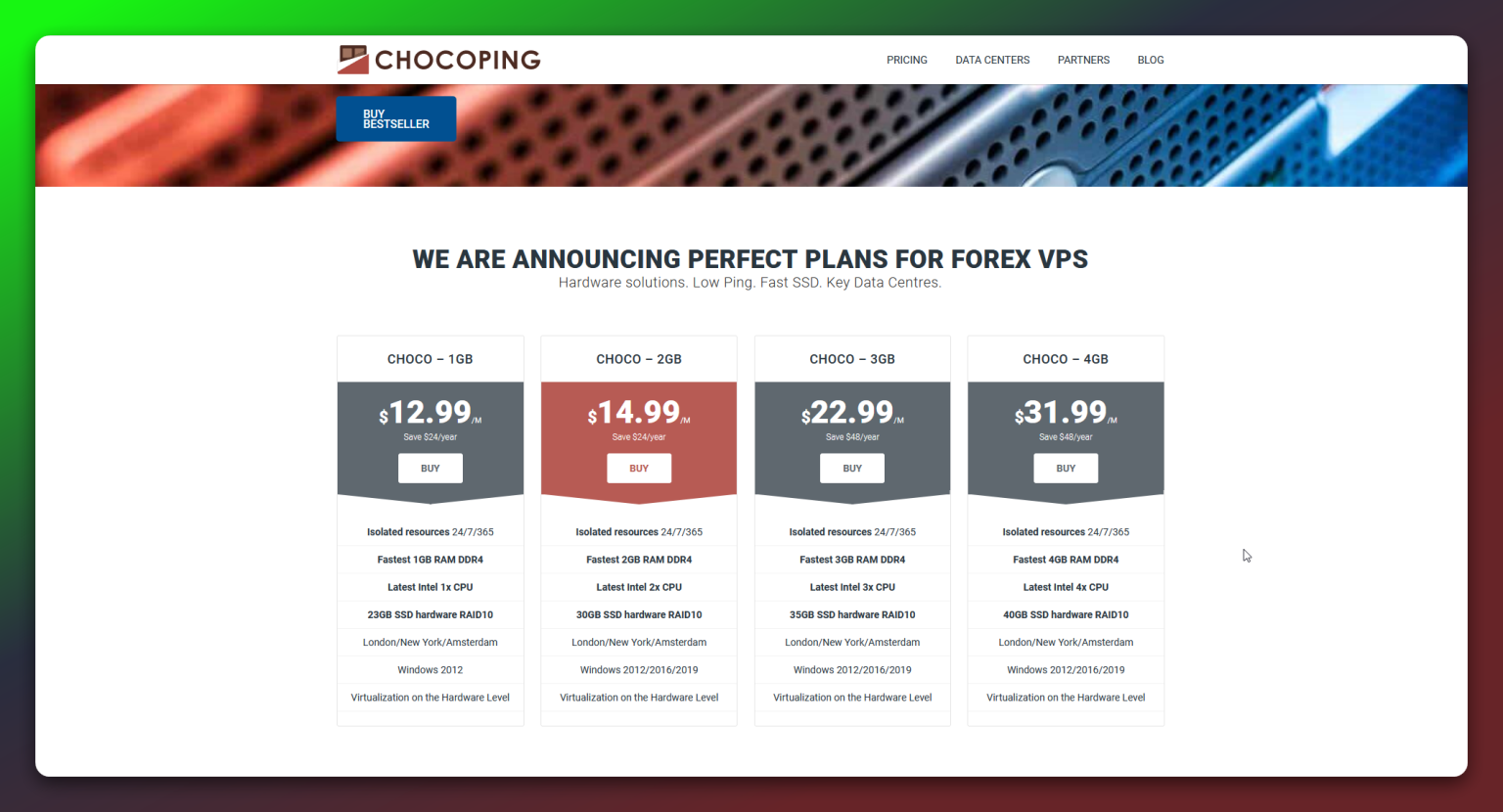
CHOCO — 1GB
$12.99/mo
for running 1–2 terminals
CHOCO — 2GB
$14.99/mo
fast 2 CPU cores, suitable for more simultaneous charts
CHOCO — 3GB
$22.99/mo
more power for higher load or multiple strategies
CHOCO — 4GB
$31.99/mo
ideal for multiple EAs and advanced tools
Click to enlarge
For minimal AI model latency, choose USA (New York)
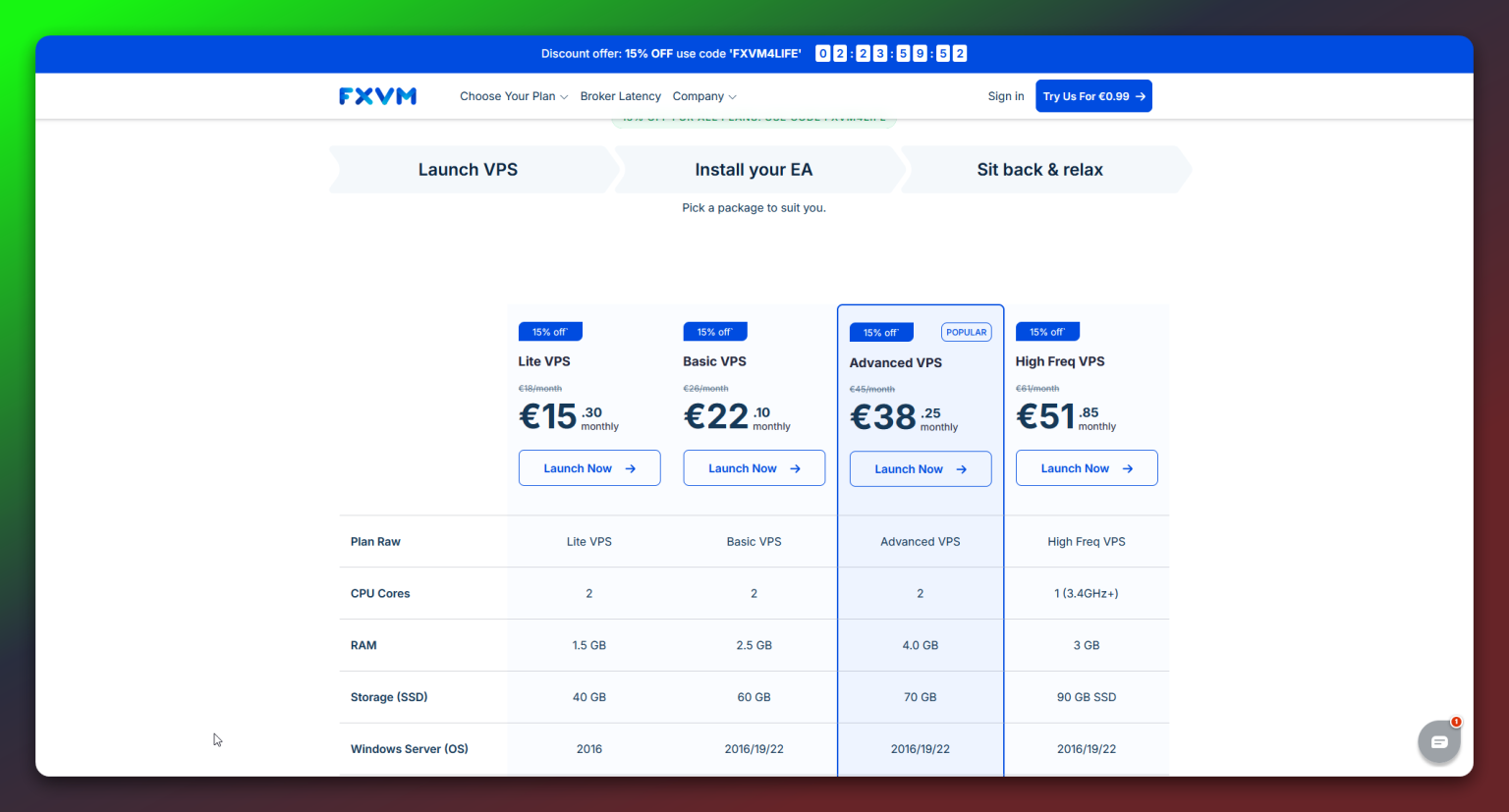
Lite VPS
$25/mo
1.5 GB RAM, 2 CPU cores, 60 GB SSD — 1–2 terminals
Basic VPS
$35/mo
2.5 GB RAM, 2 CPU cores, 80 GB SSD — 3–4 terminals
Advanced VPS
$50/mo
4 GB RAM, 2 CPU cores, 90 GB SSD — 4–6 terminals (Popular)
Click to enlarge
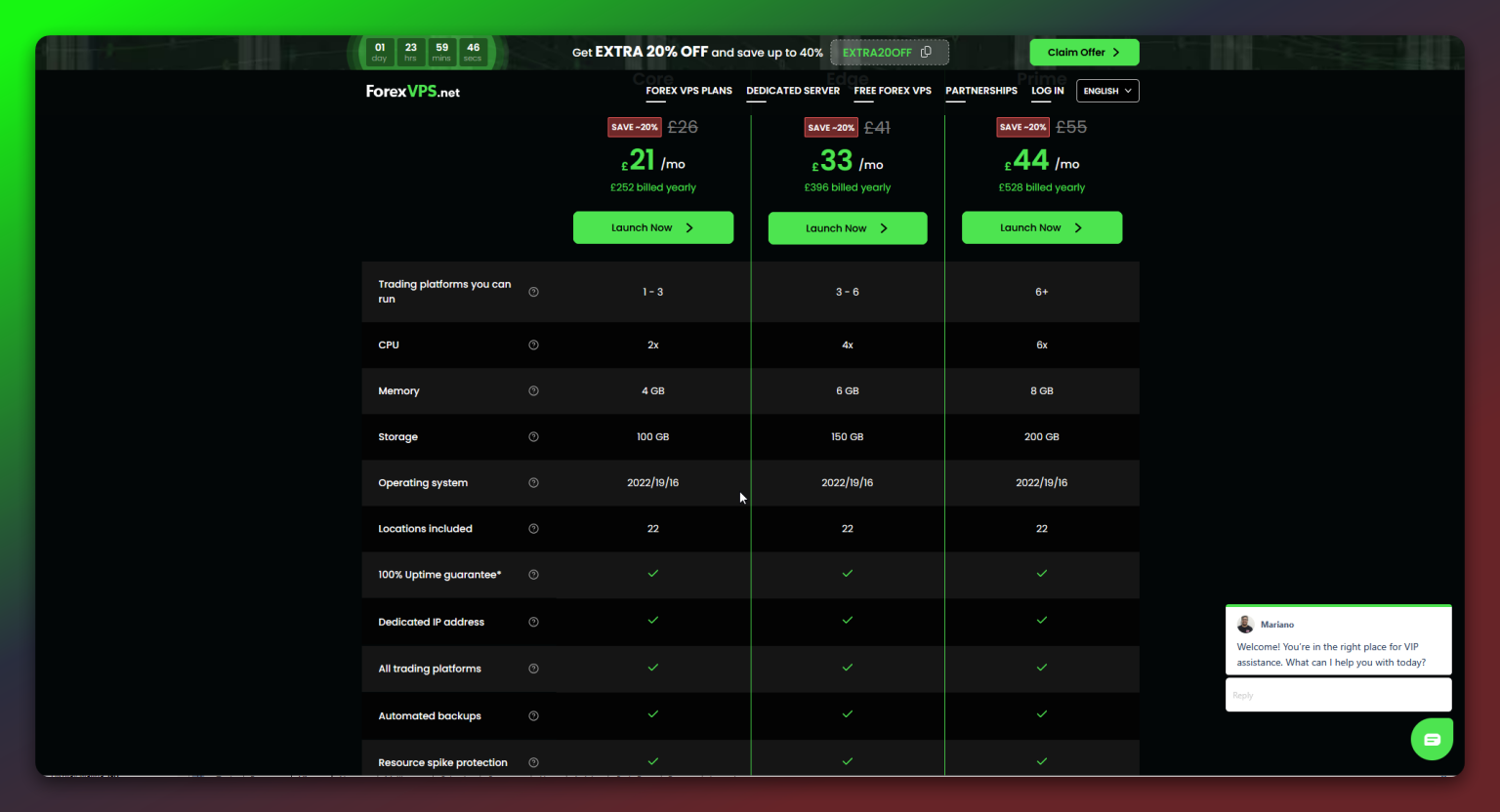
Heads-up: ForexVPS advertises many global cities, but the physical server behind a given IP is often housed in a different data center than the listed city. Verify the real location (traceroute / ask support) before trusting latency claims.
Core
$40/mo
2 CPUs, 4 GB RAM, 100 GB SSD (from $25.60/mo billed annually)
Edge
$60/mo
4 CPUs, 6 GB RAM, 150 GB SSD (from $38.40/mo billed annually)
Prime
$80/mo
6 CPUs, 8 GB RAM, 200 GB SSD (from $51.20/mo billed annually)
Click to enlarge
We may receive an affiliate fee if you purchase through our links. This helps us maintain tools and documentation — at no extra cost to you.
Connect via RDP in minutes
Remote Desktop Protocol is the standard way to access your Windows VPS.
- 1
Press
Win+R→ typemstsc→ Enter - 2
Paste your VPS IP (from provider's panel) → Click Connect
- 3
Enter your Windows Server username/password → Accept certificate
- 4
Install MT5; set AutoStart; configure your EAs
Tip: Enable "Reconnect if dropped" and "Start MT5 on login" for uninterrupted trading.
Security Checklist
Keep your VPS secure with these essential practices.
Frequently Asked Questions
Common questions about VPS hosting for trading.
Need help? We reply within 15 minutes during market hours.